Showing posts with label math. Show all posts

Wednesday, March 16, 2016

Digital Manipulatives from Math-U-See (Schoolhouse Review Crew Review!)

We received this for review purposes!

Demme Learning logo

 Product Links: Digital Packs and Epsilon

Vendor Information Link: Demme Learning

Age Appeal: The student needs to be able to do addition, subtraction, Multiplication, and division

Format: Online digital manipulatives (need Chrome or Safari browsers), video lessons, PDF Instruction Manual, Answer Keys (12 month access)

Price: Please go to the website for current prices.

Math-U-See-001

Does your family use Demme Learning’s Math-U-See program?  Is it a homeschooling math program your family would like to use?

Math-U-See now has Digital Packs.  You will get access for twelve months to everything you would get if you purchased the physical instruction pack.

Our Experience: 

My children really enjoy using Math-U-See, so I was really excited for the Digital Pack.  Our homeschool library has the fraction overlays, but each set was missing some, so B wasn’t able to do the problems.  The Digital Pack solved our problem.

B would watch the video, and use the manipulatives while he was completing his worksheets (a separate workbook is necessary).  C is working on Division with Delta, so I had her use the manipulatives when she needed the extra help.  I also had her watch a couple of the Epsilon videos, so she had an idea of what she would be doing next.

Digital Manipulatives

Mama’s Thoughts:

  • It was wonderful having this program.  I was glad that B had an unlimited amount of digital fraction overlays at his hands.  He was always disappointed when he couldn’t do what he needed to do, because some of the physical overlays were missing.
  • I liked the easy access to the lessons.  It was nice that we could use the computer instead of having to find the DVD and get it ready in the DVD player. 
  • I appreciate the instructional videos from Steve Demme.  I have the children watch them.  After they do that, they work on their worksheets.  This works for us, because they appreciate having someone different teach them something. 
  • Initially I thought it was an inconvenience when we had to use Chrome or Safari to use the manipulatives, but it worked out very well.  I didn’t even notice we were using a different browser.

Epsilon

B’s Thoughts (boy, age 12, officially in sixth grade):   

I like doing Math-U-See, but never really had access to the manipulatives, so this was perfect for me. I liked how fun the manipulatives were to use, one time I made a heart out of the blocks. I relished how you had unlimited access to all the manipulatives, and fraction overlays, and how easy it was to use. I also enjoyed watching the online math lesson videos, for Epsilon, which I am doing. I liked how we had access to the answers to the lessons, as Mamma sometimes has me check my own answers. I would highly recommend this product to kids my age.

 C’s Thoughts (girl, age 10, officially in fourth grade):

  • I think this product would be good for people who need help with fractions. 
  • The digital manipulatives are fun to work with.  You never have to worry about losing any of the manipulatives, because it’s on a computer.
  • I had fun making stairs out of the blocks, when I was done with my work.

Epsilon_zpskvehutv6

Dad’s Thoughts:

Dad was not available.

Mama recommends Demme Learning’s Math-U-See Digital Packs!

Social Media Links!

Facebook: https://www.facebook.com/mathusee

Instagram: https://instagram.com/mathusee/

Twitter: https://twitter.com/mathusee 

YouTube: https://www.youtube.com/user/mathusee

 
Crew Disclaimer
 

Tuesday, December 8, 2015

Picture of the Week! (December 8, 2015)- Multiplication

IMG_20150119_123004

There is nothing more fun than working on your math problems and wearing your elephant hat.

Tuesday, November 11, 2014

Online Math and Language Arts Learning from IXL (Schoolhouse Review Crew review)

We received this for review purposes!

IXL-001

Product Links: IXL Math (Pre-K to Precalculus)  and IXL Language Arts (2nd to 8th)

Vendor Information Link: IXL

Age Appeal: K-12

Format: Completely online (Technical Requirements)

Price: Annual Subscription: math $79/child and $99/two children, math and language arts $129/child and $149/two children (for more information and payment options go to the Membership page

math page

Do you need a fun supplemental math and language arts program?  Look no further than IXL.

IXL has hundreds of skills to be mastered in many different grades.  Your child is not required to stay at their grade level.  For example, if third grade math is too difficult for them, then they can work on second grade until the skills are mastered to move back to third. 

There are awards programs, certificates, weekly reports for parents, and feedback for each missed problem.

Help Center (for any unanswered questions).

Our Experience: 

IXL is one of my favorite supplemental programs for math and language arts.  I have found that the programs we use for math and language arts sometimes do not cover
everything we need or that the kids need more practice to master the skills they have been working on.  I was excited when we were selected to review IXL.  I knew exactly what B and C needed to work on in both math and language arts.

C's math program does an excellent job of teaching addition, subtraction, multiplication, and division.  I decided to have her work on money, time, estimation, logical reasoning, and some of the other topics her program does not cover.  I had her work on IXL three times a week for about 20 minutes each time.

Math is not B's favorite subject, so I have had a hard time finding a program that fits well with him.  IXL is the program that works for him.  I have been having him work on it five times a week for about 20 minutes each time.  I keep his lessons short, because he learns the most when they are short.

I had B and C use the language arts section of the program in the same way they used math.  We have a
good language arts program, but there are some parts that are not covered, like alphabetizing, analogies, and Greek and Latin roots.

They had fun when they got prizes in math and when they received certificates in my e-mail.

I am very pleased with IXL Learning and I plan on continue using it with B and C.
report

Mama’s Thoughts:

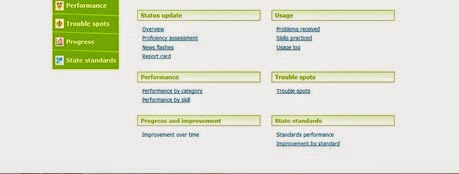
  • There are many things I like about IXL Learning.  The feature I like the best is the weekly e-mailed reports.  The e-mailed reports show me exactly what B and C have been doing and what they need to work on more.  I always know how long they have been working on math and language arts and whether or not I need to keep a closer eye on them.
  • I really like the wide variety of subjects that are offered.  B and C will never run out of things to practice, because they can do it again and again.  They will definitely be able to master the subjects that are offered.
  • I am impressed with the depth of explanation that each missed problem gives.  The student can easily study the explanation and learn how to do the problem correctly.  B and C have used this feature multiple times and it has helped them solve future problems.
  • The one thing I would change is the login process.  It would be easier if the student could log themselves in directly without having to login to their family's account first.  It can be frustrating to those people who have a hard time logging in if they have to do it twice.
  • At the beginning I did not like the "Challenge Zone," because it really upset B and C when they missed a problem and their score would go from the nineties back into the eighties and it would take much longer until they reached 100.  I know it the "Challenge Zone" has been designed to make sure that the child has mastered the skill, but it is frustrating to be getting all the answers right, then miss one and need to do so many more before mastering the skill.  B and C both get frustrated when that happens.  I think it would be nice if they could miss two or three before they lose the momentum they have built up.  

B’s Thoughts (boy, age 10, officially in fifth grade):   

I liked IXL.  I really liked Geometry.  It was really fun.  I learned a lot.  Fifth grade wasn’t so fun, but I still learned a lot.  Pre-K was fun to do on my own time.  Precalculus was fun to do and learn too.

I liked the awards.  I wish there were awards for language arts.  And that language arts started in first grade.  I liked the awards themes for geometry (space) and precaluculus (Castle).   

Overall I would recommend this product. 

C’s Thoughts (girl, age 8, officially in third grade):

I really liked the “Group Alphabetical Order” and “Order the Best” for language arts.  My favorite one for math was place values.

It is good for people of all ages.

Dad’s Thoughts:

I like the in-depth reports that IXL does on its students. They are thorough and presented in an easy to read and understand manner.  I have friends who are teachers that would love to have this kind of reporting.  It shows the strengths and weaknesses of each student as well as where each student is spending their time while in IXL.  By showing where the student is having trouble those areas can be addressed to achieve success.

IXL is well thought out and executed program for student learning.

Mama highly recommends this!

lg_logo_zps4e241931

Social Media Links!

https://www.facebook.com/IXL
https://twitter.com/IXLLearning
https://plus.google.com/+IXL

 
Crew Disclaimer

Friday, August 22, 2014

Math Practice Fun from UberSmart Math Facts (Schoolhouse Crew Review)

We received this for review purposes!

ubersmartmathfacts_zps1d9ef10d

Product Links: UberSmart Math Facts

Vendor Information Link: UberSmart Software

Age Appeal: Primarily for grades K-6, but great for any age that needs to practice

Format: Downloadable Software that works on Windows 7, 8, XP, and Vista (It can be used by eight or more students) 

Price: $24.95

Do your children need to learn their math facts or increase their speed?  UberSmart Math Facts might be what your family needs.  No longer will you need to find the flashcards, especially the ones that are missing, they are all right here on the computer.

This math program includes:

  • Dot Cards (like adding dominoes)
  • Keyboard Entry
  • Flashcards (addition, subtraction, multiplication, and division)

Students will learn, practice and then test.  They will learn the facts one group at a time, like all the ones then all the twos.  If there are problems they are unable to do, there is a special function called focus so they can practice them until they learn them.   During tests they will be able to see the previous problem and the one coming up.  They can also skip the problem and come back to it.  When the students master the skills a certificate will be available to print.

test_zpsd4e5ec1c

Our Experience: 

I am always looking for fun ways for B and C to practice their math facts.  I was excited for us to try UberSmart Math Facts.  We kept our practice to 10 minutes three times a week.  Since it is still summer time I thought that it was important for them to practice regularly, but not make it a chore.  Both of them were usually excited and willing to do their ten minutes.  It was only a problem when they became frustrated with trying to answer the problems.  Keeping it to the ten minutes helped to alleviate any negativity.

I have done some practicing on this program too.  I do it, because it is fun and I need to be able to answer math problems when B and C ask me.

This is a program that I plan on having B and C continue during the school year.

keyboardentry_zps4f013ad2

Mama’s Thoughts:

  • The Math Facts PDF has a lot of good information.  I highly recommend that you glance through it before your family begins, because you can learn about all of the functions that you may not realize are there.
  • I thought the dot cards were hard.  My brain must not think that way.  I do know it would be good for some people.
  • I am glad that the number of problems to learn can be expanded, like being able to multiply up to 20x20.  It would be nice to include it up to 12 for addition and subtraction.  B and C still have problems solving those facts. 
  • I really liked the focus part and the encouragement it gave when the task was done.  I think one of the favorite parts of the program was that we could make the screen size larger.  It is really nice when the wallpaper and icons can be hidden from view.  It is much less distracting.
  • I love all of the different functions that can be done as the administrator.  I plan on printing reports for B and C when we are back with our printer.  I want them to have a copy of how well they are working and what they need to improve. 
  • I forgot what my password is, so I am glad I can go on the internet and change it.  As the administrator I need to be able to look at things and change it. 
  • I would like it there was a separate name and password for each person.  The kids have accidently worked on each other’s accounts.  It would be nice to keep them separate. 
  • I liked the keyboard entry feature.  It would have been nice if the program would teach the children how to use the number keys in the most efficient way.  I had to show them how to correctly do it. 
  • The program is more than just learning the problems it also includes really enforcing them and learning the ones that they miss.  That is most important when learning math facts.
  • I really liked looking at the all of the parts of the program.
  • I thought the price was excellent, because more than eight children can use the program with one license.

B’s Thoughts (boy, age 10, officially in fifth grade):   

I liked UberSmart Math Facts.  I liked that it had where you could learn, practice, and test.  I also liked that it had the report section.  I wish it had the option to login, because then you would definitely know you were doing it under your own name.  In the compete section it would be nice to do have addition separate from subtraction and multiplication separate from division.  It would be nice to have addition higher than nine.

It would be good for children my age.       

DotCards_zps36872edb

C’s Thoughts (girl, age 8, officially in third grade):

It was fun doing UberSmart Math Facts.  I liked practicing my addition facts.  I mastered from the 0s to the 9’s.  Keyboard Entry was fun.  The Dot Cards were tricky.

It is good for people of all ages. 

flashcards_zpsc80ff971

Dad’s Thoughts:

Dad was not available.   

Mama recommends!   

 
Crew Disclaimer

Thursday, November 7, 2013

IXL Learning (Schoolhouse Crew Review)

We received IXL Learning for review purposes!

http://i1202.photobucket.com/albums/bb374/TOSCrew2011/Math/IXL/ixllogofixed.png

Product Links: Online Math Membership (Pre-K - 12) and
Online Language Arts Membership (2nd - 4th)

Vendor Contact Information: IXL.com

Age Appeal: Pre-K to 12th grade math, 2nd-4th grade currently for language arts

Format: online program

Price: $9.95 per month for math or language arts, $15.95 a month for both, $79.00 for either math or language arts, and $129.00 a year for both for one child. Each additional child is only $2 per month, or $20 per year.

 photo 280956_362445090496975_1685320066_o_zpse8620420.jpg

Are you looking for a fun online program for your children to use to reinforce their learning in language arts or math?  IXL might be just the program for you!  There are more than 2,500 skills to learn and they can practice with the click of a button.  They receive medals and awards when they accomplish different skills.  They will also receive printable certificates for their achievements.

You can try out the program for free with 20 questions for the day.

Our Experience:

I was excited that we were able to use IXL Learning.  We had come across the program before and C was disappointed when her 20 free questions were done for the day. 

We used IXL five times a week for both language arts and math.  We did each subject for twenty minutes each day.  When B and C worked on each subject I let them select what topic they would work on.  I knew that as long as they were working on their grade level they were learning and expanding what they needed to know for their grade level.

I was glad that I was able to select the state we live in.  I knew then that B and C were getting the specific education for our state.  It was a comfort.

 photo IMG_6332copy-Recovered_zps68039f50.jpg

Mama’s Thoughts:
  • I liked that B and C could pick which topic they wanted to work on.  In math, C worked on money, patterns, addition, and more.  B worked on geometry, rounding, probability, word problems, and more.  In language arts they worked on future tense, antonyms, nouns, verbs, and more.
  • It was great that B and C didn’t have to work on a certain grade level.  If they had a problem with the grade level they were working on they could select a lower grade to get some easier practice first.
  • One thing I didn’t like was that when the children entered the “Challenge Zone” at a score of 90 and they missed only one question that their score dropped back into the 80’s and  they had to answer a lot of questions to be able to get back to 90 again.  I realize that going back down was for mastering the skill.  I found it discouraging when I tried it and all  I had done was miss one question and had to go through the process all over again.  I think it would be better if you could miss two questions, instead of just one.
  • I enjoyed being able to try the program under my name.  It made me realize how much I have forgotten or never had the chance to learn in school.  It was fun to see what they were learning.
  • I know IXL Learning is generally not used as a teaching tool, but as review.  I thought their explanations of the incorrect problems taught them what they need to know, unless it was something more complex like multiplication and division.
  • The children were so excited when their certificates called, “Certificate of Achievement” came by e-mail.  Their certificates were for time completed, tasks completed, number of questions, and more.  I imagine we could fill our schoolroom wall with printouts of their certificates.
  • I especially enjoyed the weekly e-mail reports I received each weekend on the children’s progress for the past week.  I was able to know exactly what they did and how well they were doing it.
  • I was so impressed with IXL, that I am planning on implementing it into our daily school schedule.  When B and C are using IXL Learning I feel they are learning exactly what they should.

B’s Thoughts (boy, age nine, officially in fourth grade): I liked fourth grade language arts.  I liked learning about action verbs, similes, metaphors, and greets and closings in letters.  You can do more on IXL than reviewing the skills, you learn a lot too.

Although math is not my favorite subject, I really learned a lot.  I learned some geometry, probability, and more.

I think this product would be good for kids my age.  

B IXL

C’s Thoughts (girl, age seven, officially in second grade):  I really liked math.  I liked learning about money in math.  I liked getting the prizes.  See some of my prizes in the picture below! 

I liked changing the present-tense verb into the future-tense.  I liked all of what I did for language arts.

I enjoyed doing each subject for twenty minutes each day. 

It is good for people of all ages, grownups and children.

 C IXL


Dad’s Thoughts:

The IXL Learning website is a great tool to use in conjunction with your homeschooling lessons to reinforce what's been taught. The design is appealing and it's easy to navigate to get where you want to be and the topics are broken down into easily identifiable categories. IXL is a top notch online practice program for math skills and language arts. Having said that, you will still need to teach the basics of each subject. For example, IXL asks the student which word in a sentence is the noun. The student then selects the best multiple choice answer. IXL doesn't explain what a noun is, the program simply asks you to identify it. I would suggest that to really take the "wow" factor up that IXL provide parents a sort of test module. The module would simply have the same programming that the students see but that the parent would read the questions and have the student verbally answer. This would confirm that students are actually comprehending the subjects and not just mastering multiple choice. Even without the test module IXL is wonderful program to add to your teaching toolbox. I know B & C are enjoying it.


Mama highly recommends IXL Learning!

Photobucket

 photo DisclaimerGraphic1_zpsf612f371.gif

Wednesday, May 18, 2011

Mad Dog Math

Photobucket

Product: Mad Dog Math

Vendor Contact Information:

www.maddogmath.com

Mad Dog Math

4562 Ocana Avenue

Lakewood, CA 907013

Contact us page

Phone- (562)533-5772

Age Appeal: kindergarten to 5th grade primarily and up

Format: Downloadable Software, Windows Format

Price: 1 Year License ($19.99), 2 Year License ($29.99), Perpetual License ($39.99)

From the website:

The Essentials of Mad Dog Math

  • Enables children to master their +, -, x, and ÷ facts in a fun challenging, exciting, and motivating way

  • Math supplement for any math curriculum

  • For grades K through 5th; remedial middle school and high school

  • Standard, daily 10 minute time commitment from start to finish

  • Huge body of math facts broken down into bite-sized pieces any child can master

  • Applied system that works in every classroom and in every home

  • Students, teachers, and parents LOVE it

A Free Trial is available in Windows 32 bit Version or 64 bit version.  Only the first fact family in each of the levels is available in the free trial version.

Our Experience:  The website recommends doing Mad Dog Math for 10 minutes per day, so that is what we strived to do. 

This was a program that B had a bit of problem for some reason.  I think it was because he has never practiced addition and subtraction by families before.  He was also stressed with solving 20 problems in two minutes, when it was timed.  B and I butted heads a bit and so he did the program with Dad.  It helped out a lot and he ended up having a lot of fun.

C worked on doing the program without being timed until she felt comfortable timing it.  She seemed to have a lot of fun and was always eager to work on her problems.

What I Liked:

  • The problems were divided up into small fact families.
  • There were three levels which helped reinforce the fact families.
  • Good instructions with the software, explaining how to do the program. 

What I Disliked:

  • For example, you had to know all the fact families of addition, before you got the club sticker for each time level.  For some kids they need to be rewarded more often.  It makes the game more rewarding. 

Photobucket

What B (boy, age seven, officially in first grade) Liked  and  Disliked:  It was very fun.  I am all the way up to “9 to 11 Subtract.”  Some parts were tricky.  In the parts that were really tricky, I did not use “Time Me.”   I couldn’t move on until I used the “Time Me” button.  I think Mad Dog Math is good for kids my age.

Photobucket

What C (girl, age five, working on kindergarten) Liked and Disliked:  It was fun.  Most of the time I got them wrong, but I tried all over again.  I did it with no timing and with timing.  It was good for kids my age.

What Dad Liked and Disliked:  I liked what Mom liked.   The only thing I disliked is that when you complete the 20th problem the test automatically stopped. You do not get a chance to review your answers before being corrected. It would be helpful if you could manually stop the test when you are done in addition to the test stopping at the 2 minute mark.

Other Products Available:  Please go here to see more products for both the classroom and homeschool.

I would recommend Mad Dog Math for kids who need to work on math drills and need to do it in small fact families. For more reviews go to The Homeschool Crew review page.

Disclaimer:  I received Mad Dog Math for free for review purposes through The Homeschool Crew. All links were current when posted.

Thursday, February 24, 2011

Math Rider

Photobucket
Product: Math Rider
Vendor Contact Information:
www.mathrider.com
Sharper Edge Pty Ltd
31 Hannah Street
Beecroft NSW 2119
Australia
Phone- +61 2 9980 2437
Hours- 9am to 5pm (East Australian Time), Monday-Friday
e-mail- use contact form on website
Age Appeal: ideal age is 7-12
Format: Download (System Requirements) available for Linux, Windows, and Macs
Price: $37 U.S.

Are you looking for a fun way for your kids to learn their math facts? Math Rider is a fun way to do it. When your children log in they can either practice or begin their quest. There are three quests they can go on, easy (0-5), medium (0-10) and advanced (0-12). If they are able to complete the advanced level with a 99% or better mastery they will go to the master level where it is a race against time. The rider will go on a quest with their horse Shadow in the Mathlands. They will acquire a special flower, gem, letter to the king and finally the chance rescue the princess.

As the parent you will be able check on your child's progress with them, by seeing how far they have made it on the quest map. The statistics page will show what problems have been mastered and what still needs to be worked on. It even gives a list of the top five facts that are currently the most challenging.


Our Experience:
I downloaded Math Rider onto two computers, so both kids could work on it at the same time. I decided to show B and C what it was like before I let them try the program. We set up our user names and passwords, then I showed them how to do it by doing a practice run.

B recently began learning multiplication, so he was excited to try division. He is doing an advanced quest, but his mastery is only at 14%, so he will be excited when he sees improvement. He has also been working on improving his mastery percentage on the easy addition quest. B is currently above 80% on that quest. One of his favorite things to do is listen to the story that comes before the quest and after.

C is just beginning to learn her math facts, so this program has helped her immensely. When we started this program she was unable to add any of the 1+'s and now she can add up to 1+12. And she is working on the 2+'s. Within the next week I would think that C should be adding up to 2+10. Until she is able to know her addition facts from with 0-5 added up to twelve (easy level) she will continue to work on the practice runs. This will help her to have success on the quests.

I decided to play an addition quest which was a lot of fun. The kids enjoyed watching how fast I could go. The hardest part for me was adding horizontally and not vertically, as I do mentally. I can easily do it now and I am looking forward to working on subtraction, multiplication and division. As a teacher I am going to need to know my facts as well as my students!

What I Liked:
  • The kids were always excited to do Math Rider! They wanted to do it all day long.
  • It has helped C to finally begin to learn her addition facts.
  • B has been able to consistently improve his memorization of his facts. He has especially been having fun with division.
  • It has been great for me to see how well I can remember my facts.
  • It repeats the facts that are missed, so they can be memorized.

Photobucket

What I Thought Was Difficult:
  • When I first worked on my addition quest I had problems reading the numbers on the bottom of the screen. As I played more the problems became easier to read.
Photobucket

What B (boy, age seven, officially in first grade) Likes and Dislikes: I love Math Rider! I think Math Rider is absolutely great! I am working on division, for example 25/5=5. Also 20/4=5. I am also working on addition. Each quest is made of different levels, easy (0-5), medium (0-10) and advanced (0-12) and there is a special master level. You have to get 99% or better mastery to do the master level. I am the advanced level of division and my mastery is 13%. It will take me a while to get to 99%! I used to be at 14%. On the easy addition quest I have 100% mastery and I am 74% done. I did get frustrated sometimes, when I didn't get the right answers. There was nothing I disliked. I think Math Rider is good for kids my age.

Photobucket
What C (girl, age five, working on kindergarten) Likes and Dislikes: I like Math Rider. It was fun. I don't know my math facts very well yet so, I do the practice runs. First I started with 1+0 up to 1+5, then up to 1+10, then up to 1+12. I can do practice runs with no wrong answers, but sometimes I get a couple wrong! Now I am working on 2+0 up to 2+5. I am so glad I am doing Math Rider and learning my facts, so I can go on a quest!

Photobucket

Dad's Call: After playing Math Rider on different levels for different math sets I found it to be a good source for reinforcing addition, subtraction, multiplication and division skills. There is a set amount of time to correctly answer each problem. If it's not then the program repeats the problem and shows the correct answer. I like the idea of the quests as it gives a goal for completion. The progress page is one of the best I've seen in quite while. It's very simple and straightforward. You know where your child is at with just a glance.

What I didn't like about Math Rider was the horse sounding off every time you got the answer right or snorted if you got it wrong. While the audible reinforcement is a positive for missing an answer it's quite annoying when you get it right. The program would be better if the quests were varied between the skill set levels. The same quest was used for the easy level regardless whether it was addition, subtraction, etc. Having a different goal (while still using the same quest routes) would greatly improve this program. Otherwise by the time you finish the fourth easy quest the excitement of completion has faded.

Overall I liked Math Rider for it's functionality but it could have been made far better with just a few tweaks here and there.

Other Products Available: None at this time

I would definitely recommend Math Rider product. For more reviews on Math Rider, please go to The Homeschool Crew review page.

Disclaimer: I received this product for free for review purposes through The Homeschool Crew. All links were current when posted.